
1. Image -Based Video Retrieval via Embeddings.
Image-based video search works by analyzing what’s actually in the picture you give as a query, then matching it against the visual meaning stored inside video frames. Instead of relying on labels or written tags, the system pulls out key features straight from the pixels of both the query image and the indexed video frames. It skips human-added info entirely – focusing just on colors, shapes, textures, and structural patterns inside each frame.
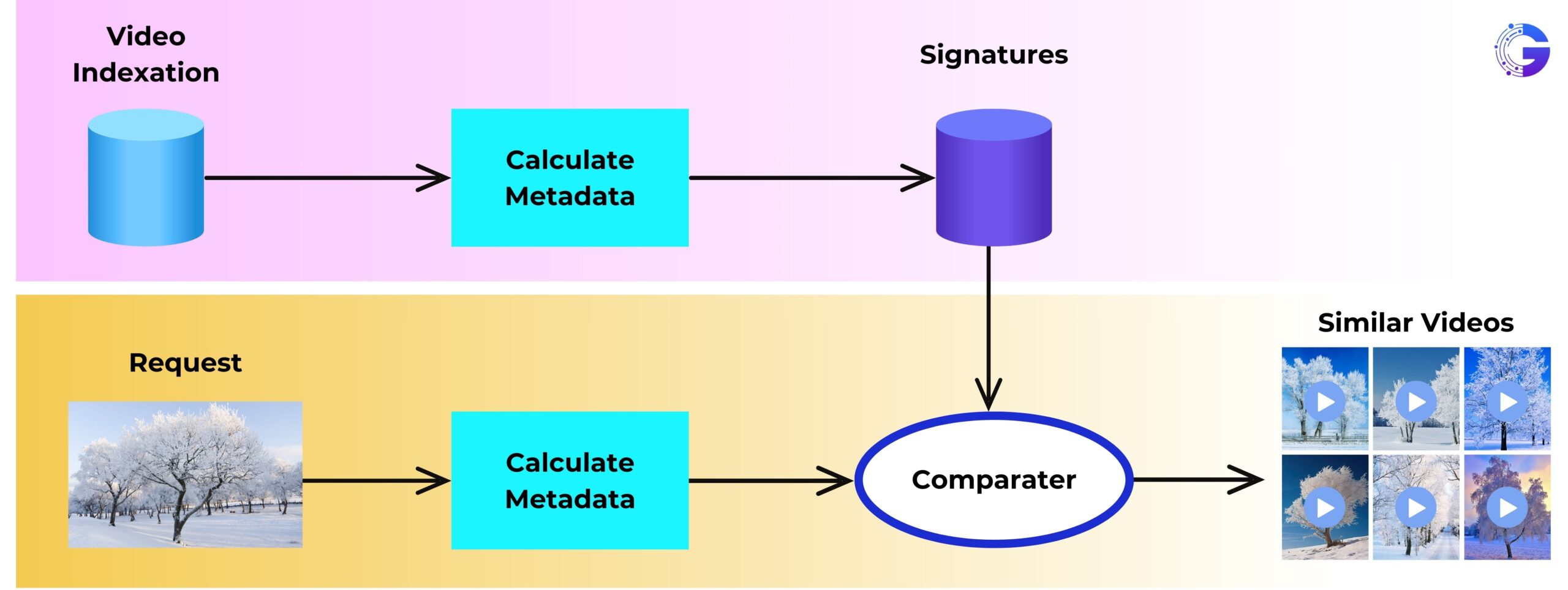
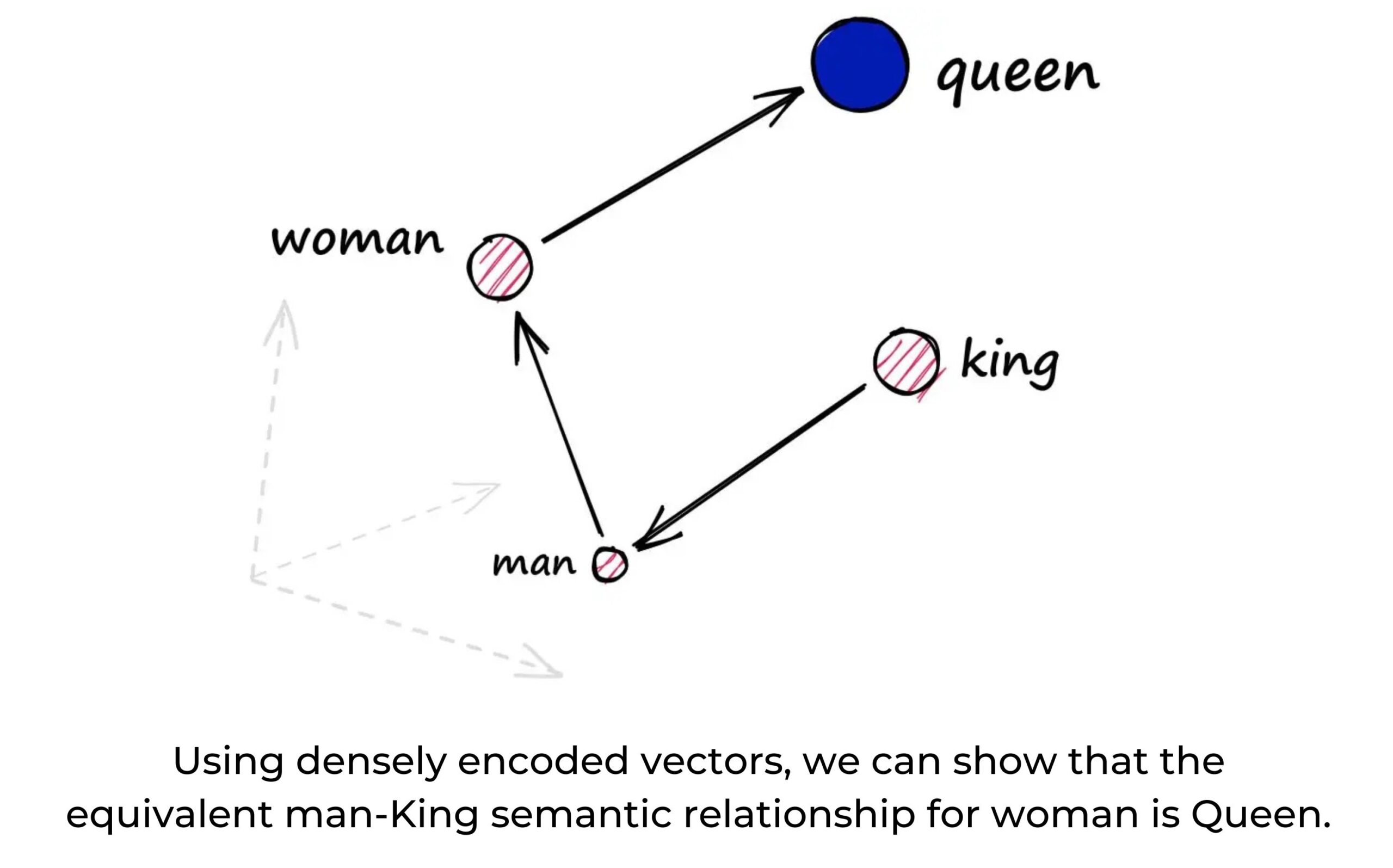
A vision encoder (like a Vision Transformer, a CLIP-style dual encoder, or a mix of CNN and Transformer) processes every extracted video frame during indexing. It turns each frame into a fixed-size embedding vector. This representation holds key meaning: objects present, layout of the scene, background details, surface textures, and how elements relate in space.
The same encoder processes the query image to generate its embedding. Since both the image and the video frames live in the same continuous high-dimensional latent space, the system can compare them directly — searching by meaning instead of exact keywords.
This setup lets you retrieve matching video scenes simply based on how the query image looks or what it represents, without needing any manual labels, metadata, or descriptive text.
2. Indexing for Large-scale Retrieval.
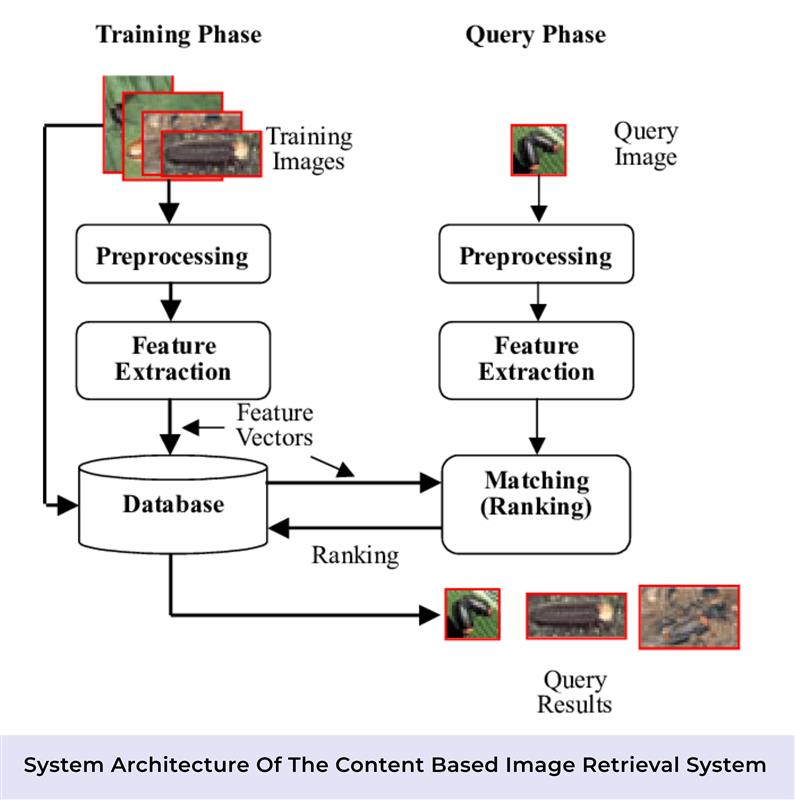
After creating embeddings, they are indexed for efficient similarity search. In big setups – say, from millions up to a billion frame embeddings – approximate nearest-neighbor (ANN) methods are used.
- Common ANN tools feature FAISS – this handles high-dimensional searching, grouping data, shrinking file size, while also working faster on GPUs.
- The index might rely on algorithms like HNSW or IVF (inverted file) – to save and search embeddings quickly; another option is product quantization, often called PQ, which helps cut down memory without losing much accuracy.
- The query image gets processed by the same vision encoder, then its embedding is used to perform a k-nearest-neighbors (kNN) search in the index to find matching frames or scenes.
3. Post – Processing & Filtering.
The relevance of the results obtained through the retrieval process is ensured by further processing, which also reduces the noise and groups similar hits together.
Similarity thresholding: Eliminate the matches whose cosine (or dot-product) similarity falls below a certain threshold.
Redundancy suppression: Combine frames that are close in time into one scene so that nearly identical frames are not shown repeatedly.
Object-level verification: Object detectors (e.g., YOLO, DETR) can be run on the retrieved frames to confirm the existence of certain entities (logos, faces, vehicles) and discard the false positives as a part of the optional process.
Integrating Graph-RAG (Knowledge-Graph + Embedding) for Summarization and Context.
Apart from just using embeddings, a Graph-RAG (graph-based Retrieval-Augmented Generation) setup might pull info together through a knowledge graph to give clearer overviews. Instead of raw data alone, it builds connections that shape better context. While embedding search finds matches, the graph layer adds structure by linking ideas logically. So rather than listing results, it shows how things relate. This way, answers come across more like stories than scattered facts.
1. What Is Graph-RAG?
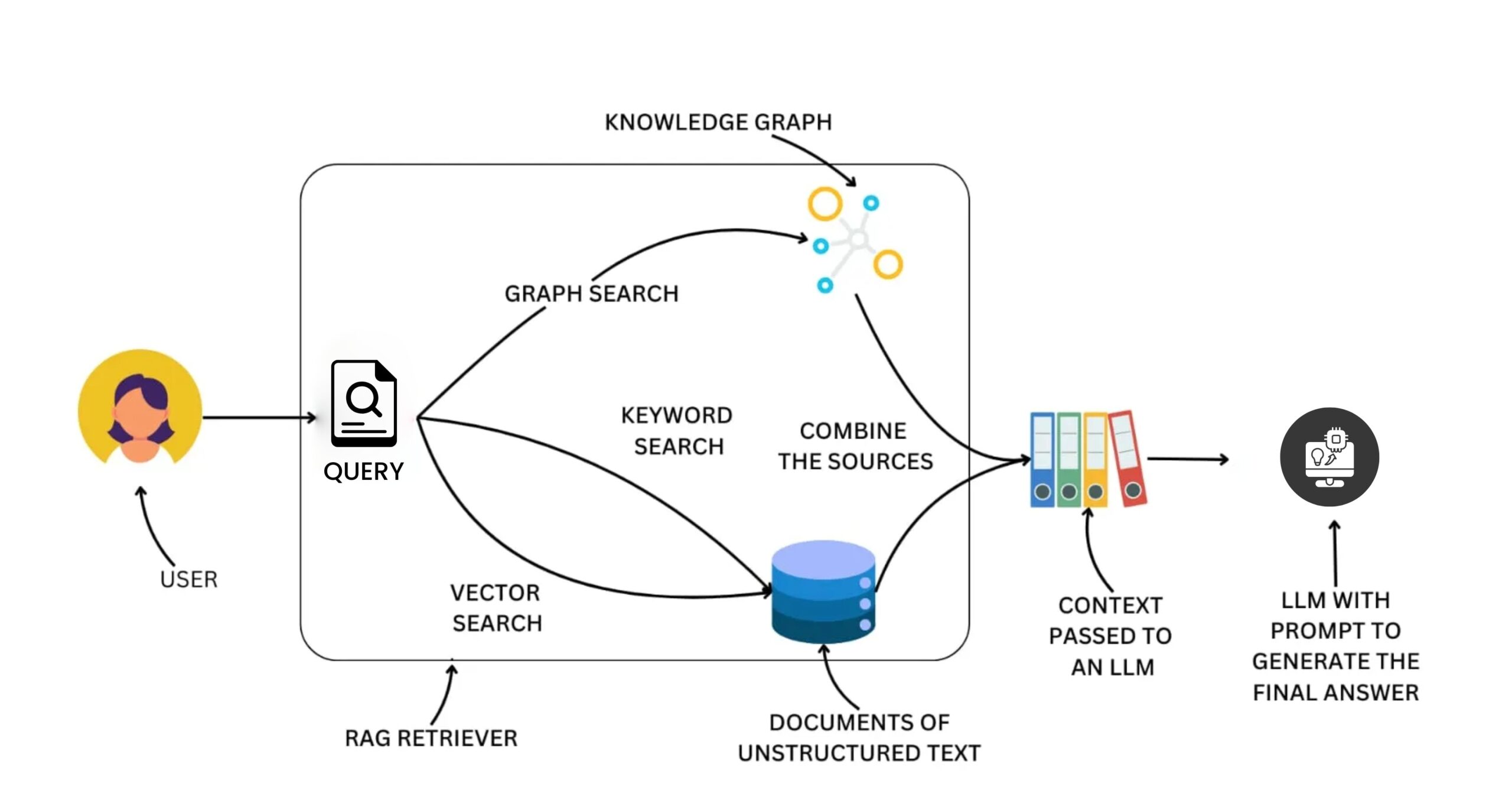
Graph-RAG augments traditional RAG (retrieval-augmented generation) by combining:
- Vector retrieval (dense semantic similarity)
- Knowledge-graph retrieval (structured entities + relations)
This mix helps the system pull related info – also understand links between items – while shaping summaries that match the search. It doesn’t just collect data; it makes sense of connections – then highlights what matters most based on your question.
Common academic frameworks involve KG²RAG (Knowledge Graph–Guided RAG) – this grabs initial bits using vector match, then spreads through the network to pull linked details.
This mix helps the system pull related info – also understand links between items – while shaping summaries that match the search. It doesn’t just collect data; it makes sense of connections – then highlights what matters most based on your question.
Common academic frameworks involve KG²RAG (Knowledge Graph–Guided RAG) – this grabs initial bits using vector match, then spreads through the network to pull linked details.
2. Graph Construction
Here’s how folks usually put together a knowledge graph:
Entity extraction: Names, things, companies, ideas – along with the relationships between them — are pulled out from a corpus (e.g., text metadata, transcripts, video descriptions) using NLP or LLM-based extraction while building the knowledge graph.
Graph embedding: Nodes plus connections get turned into vectors – using tools like node2vec or GNNs – to support efficient retrieval.
Group summary: Nodes are first grouped into clusters – typically after extracting nodes and relations from chunks. Each cluster is then summarized into a short recap using a large model, instead of listing every detail.
When a question comes in, related sections of the graph get picked out by understanding semantic meaning. Then, condensed snapshots of these clusters help shape organized background info for the language model.
3. Query-Time Hybrid Retrieval and Summarization
Once someone sends a picture search:
Embedding retrieval: The query’s embedding pulls close-looking video clips from a packed database.
Graph lookup: Items related to the query – for example, entities detected in the query image — are used to navigate the knowledge graph. Since the query is an image rather than text, an image description model first generates a textual representation of the image, which is then used to search across the graph data.
Context integration: Results from vector search mix with those from graph lookup. Relevant bits of the subgraph – like grouped nodes or linked paths – get boiled down. These clear snippets act as background info.
Generation / Explanation: An LLM takes the gathered info – then shapes it into a clear answer based on what was asked. Instead of just listing hits, it spots patterns like topics or links between ideas. The result? A tidy breakdown built from those matching pieces. That’s what comes out when you use Graph-RAG.
4. Benefits of Hybrid Approach
Semantic range along with variety: Basic neural search can dig up similar-looking results, yet using graphs helps pick varied, meaningful pieces. New studies suggest adding a graph layer improves coverage for retrieval-augmented tasks.
The system digs up linked info by hopping through connections – like going from a brand to its ally, then to a rival – using network paths.
A clear overview: Turning knowledge graphs into summaries creates organized results – instead of random snippets – with better clarity because they show connections using visual or logical layouts that make sense step by step.
Fewer mistakes/Reduced hallucination: When info comes from a fact-based network, summaries stick closer to truth. Like how KG²RAG shows clearer results using linked facts instead of loose guesses.
Use Cases: Image Search + Graph-RAG in Media Workflows.
Here are some key enterprise use cases enabled by combining embedding-based image retrieval and Graph-RAG summarization:
1. Compliance Monitoring
- Spot every frame with controlled visuals – like faces or signs – using only smart data patterns instead of manual checks. No extra tools needed, just embedded signals doing the work behind the scenes.
- Count how often things appear using Graph-RAG – this requires building a specialized knowledge graph that tracks occurrences – linking people to places through connections while also capturing background details like tags or organizations tied to nodes such as plates or firms.
2. Brand Monitoring
- Detect occurrences of a brand/logo in content without relying on pre-tagged metadata.
- Walk through the connections to map out where the brand shows up – check what else pops up alongside it, like sponsors or key figures, then piece together how often and where it’s seen in the videos.
3. Copyright/ IP Protection
- Spot clips that look alike – even if tweaked with cropping, filters, or added layers – like copied scenes from videos.
- Tap Graph-RAG to show how these scenes connect to recognized IPs or copyrighted stuff in a knowledge map – like pointing to creators or license details.
4. Archive & Discovery
- Pull every scene that feels alike – same person, car, or place – even if no tags exist. Use likeness instead of labels to find matches. Skip hand-written notes; let patterns do the work. Match visuals, not keywords. No human input needed.
- Picture this using a graph: “Actor A shows up at place L when event E happens,” which helps editors or asset handlers spot groups of similar stuff fast – thanks to clearer links between pieces.”
Conclusion
Image search using only embedded data, no tags, works fast at large scale because it uses pure visuals instead of manual metadata. With Graph-RAG added, the setup can explore connections in a knowledge network, follow indirect links across several steps, then build clear summaries that show what matched images mean within their situation.
This mix hits hard in business tasks like checking rules, tracking brand use, guarding copyrights, or digging up old files – cases where knowing why something showed up matters as much as finding it.


