
Ads on media are evolving faster than many companies expected. Since audiences now ignore old-school commercials, services have to adapt instead. Today:
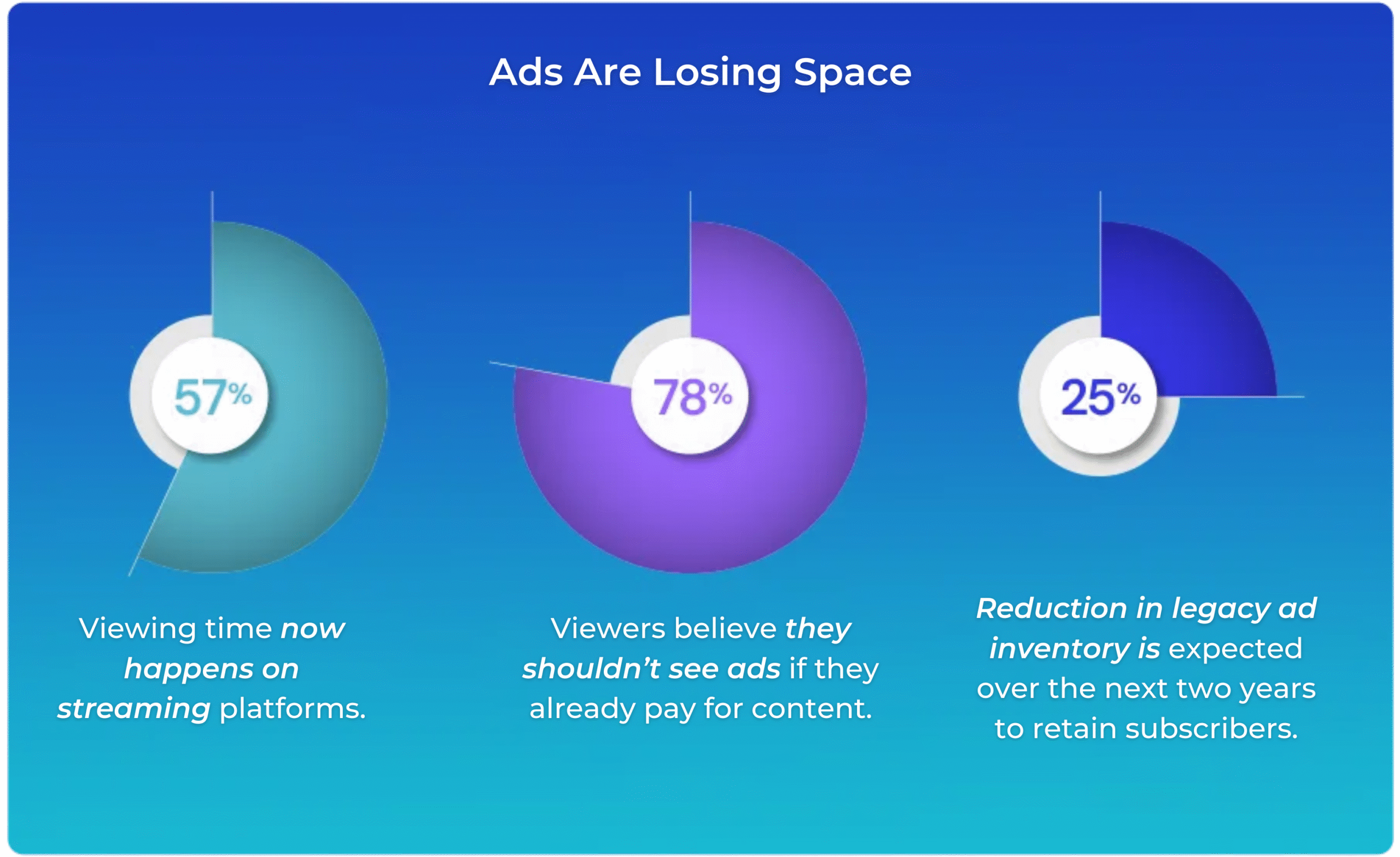
The bottom line? Pushy ads just aren’t working like they used to.
But the need for brands to be visible hasn’t changed yet – it’s simply changing it’s shape.
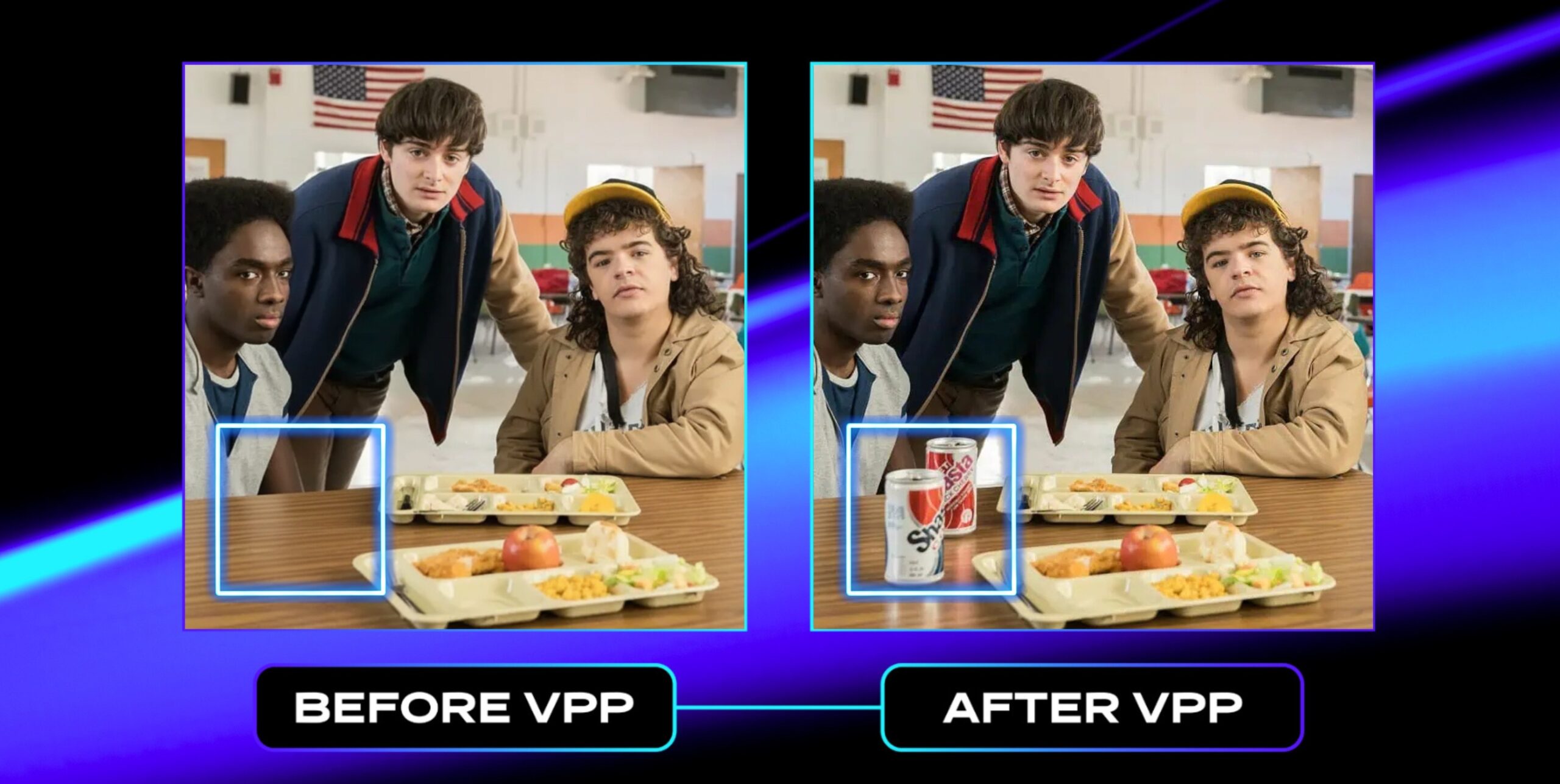
Virtual product placement (VPP) slips brand elements into videos after they’re made – looks real, fits the scene, works smoothly across loads of clips.
Rather than shoving ads beside videos, VPP tucks them right into the scene – keeps you focused. It blends spots where they belong instead of popping distractions up front.
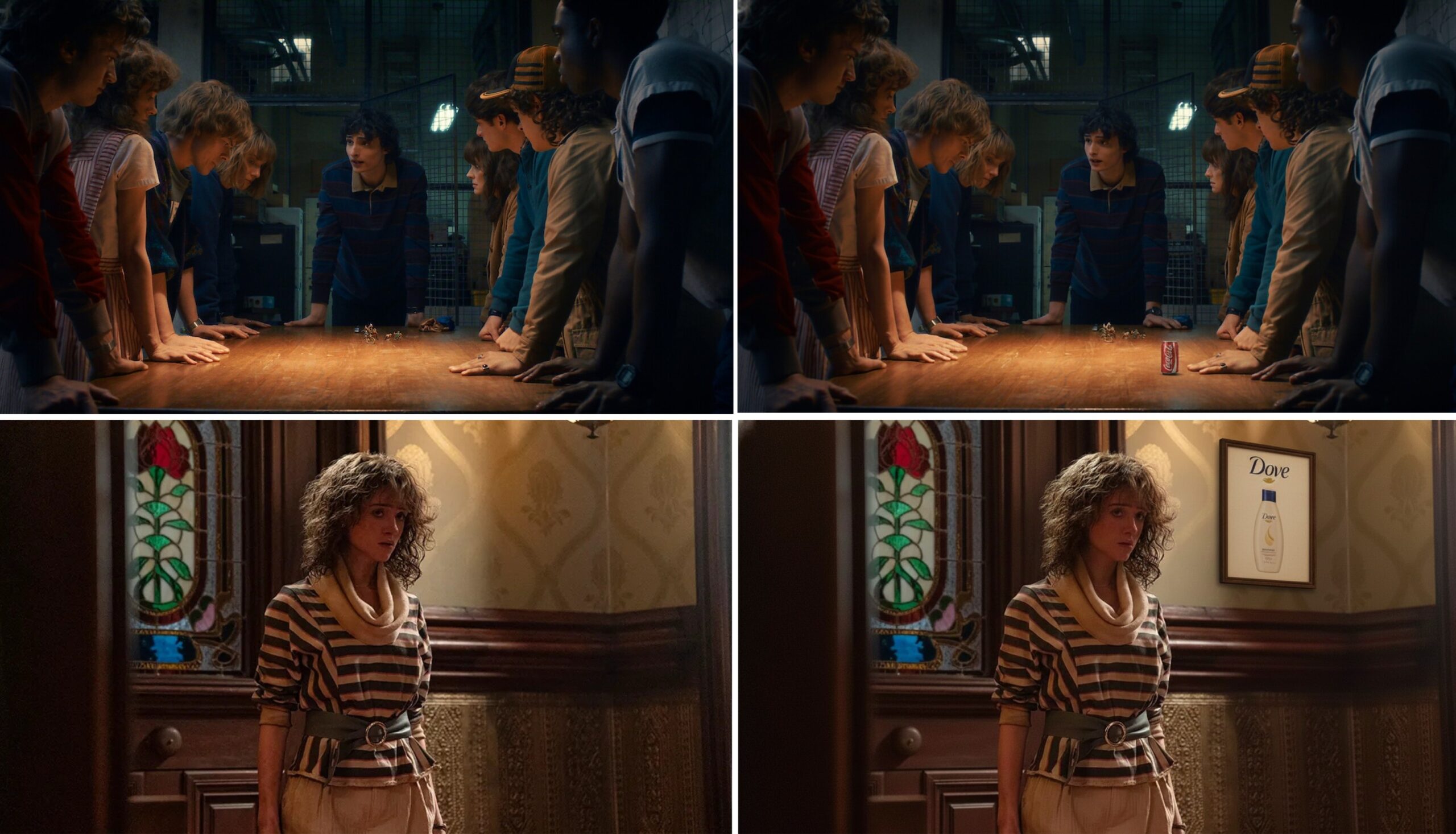
This blog breaks down how Virtual Product Placement/ in-scene ad placement really works, showing the tech behind it along with its effects – starting with spotting regions then smoothly fitting ads in – by looking at what actually happens when you build something like this.
Why Virtual Product Placement Works?
With virtual product placement, there’s no breaking focus like pre-roll, mid-roll, or banners tend to do. Rather, it works the way folks usually take in what’s around them.
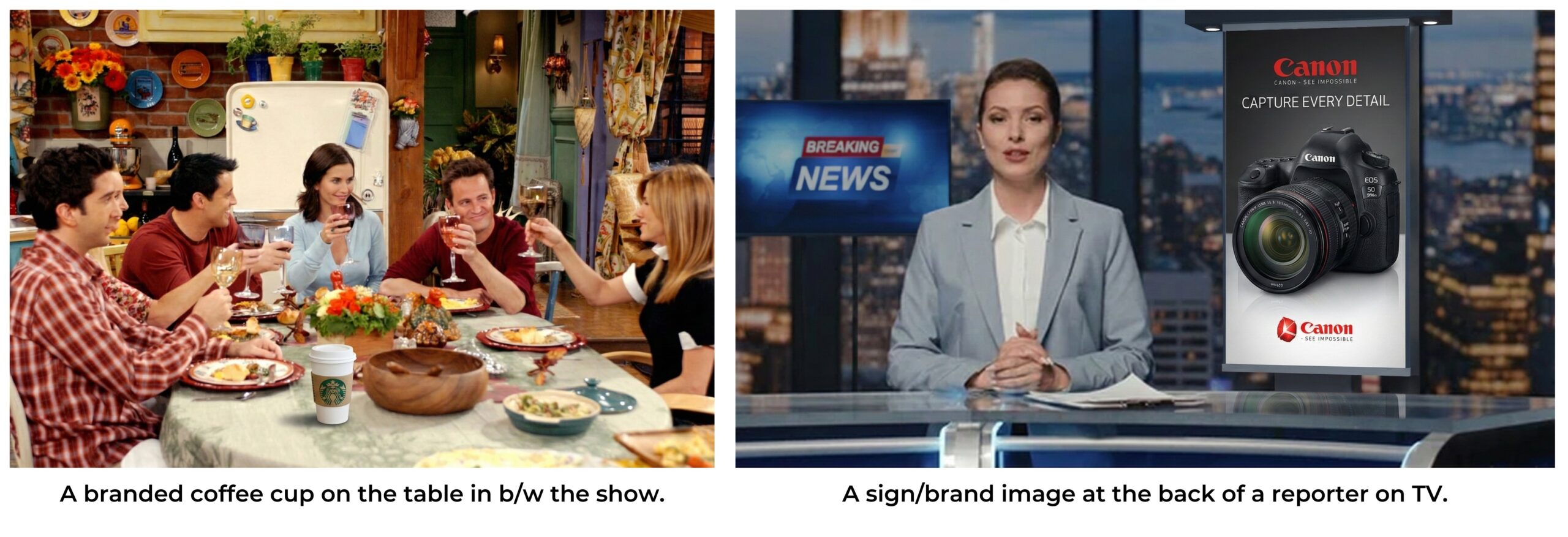
Placed right, these pieces fit naturally into the moment – like they belong, instead of stick out.
This method gets results since it ties together three key pieces:
- Contextual relevance.
- Visual realism.
- Technical scalability.
These foundations turn content into active ad space while keeping the way you watch unchanged – yet they don’t mess with how things feel or flow.
How the Virtual Product Placement Workflow Operates
It’s a fully automated ad placement platform that takes video as input, understands objects, activities, context, and themes, and places contextually relevant ads at the right place and the right time.
Here’s how things move step by step inside our setup.
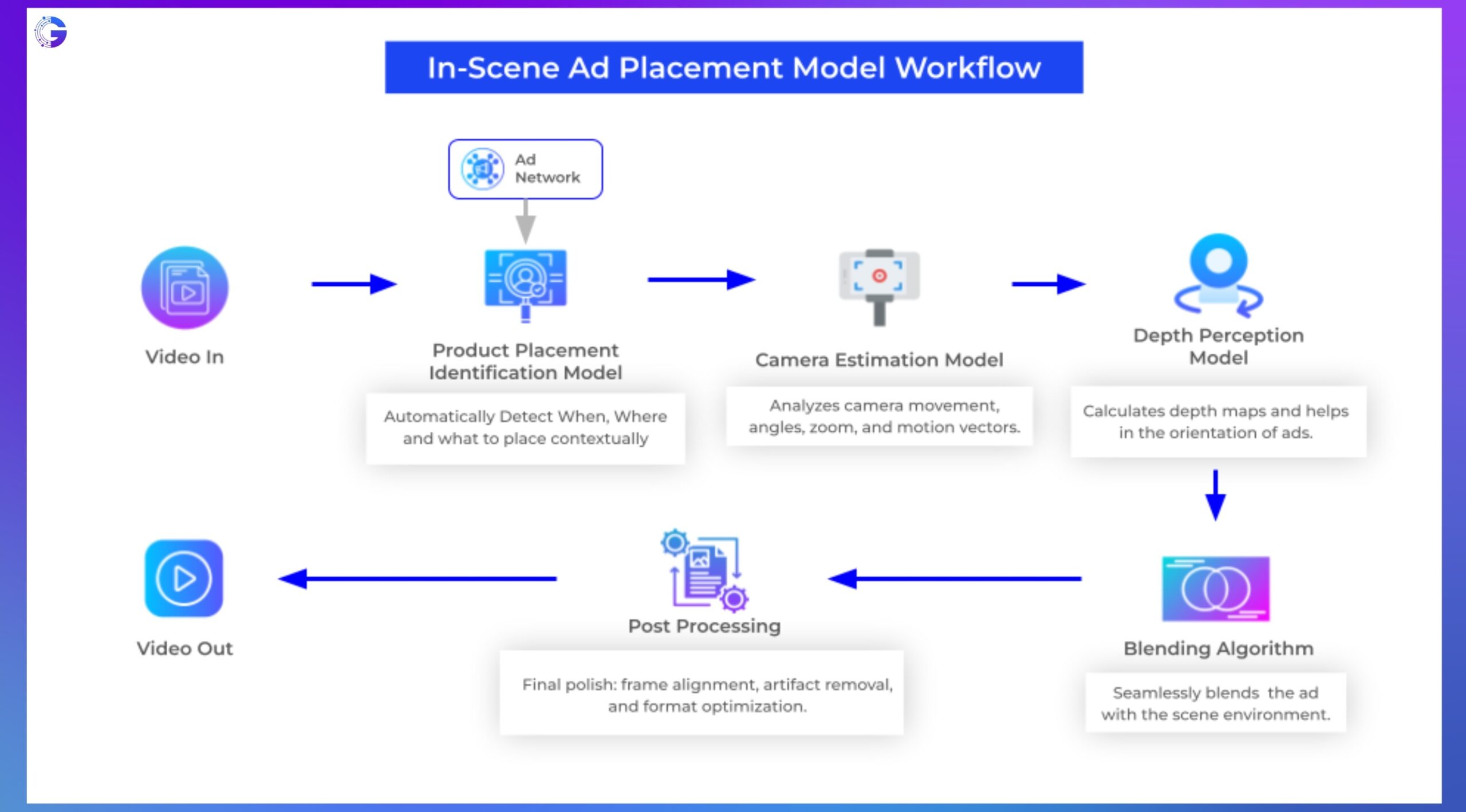
1. Import and Analyze the Video
The system starts off handling the video one frame or chunk at a time. That means it works through each piece separately – using breakdowns instead of tackling everything together
- Scene segmentation.
- Camera motion tracking.
- Object and surface mapping.
- Lighting consistency detection.
- Identifying dynamic vs static elements.
This move helps the setup get how visuals act during the whole clip.
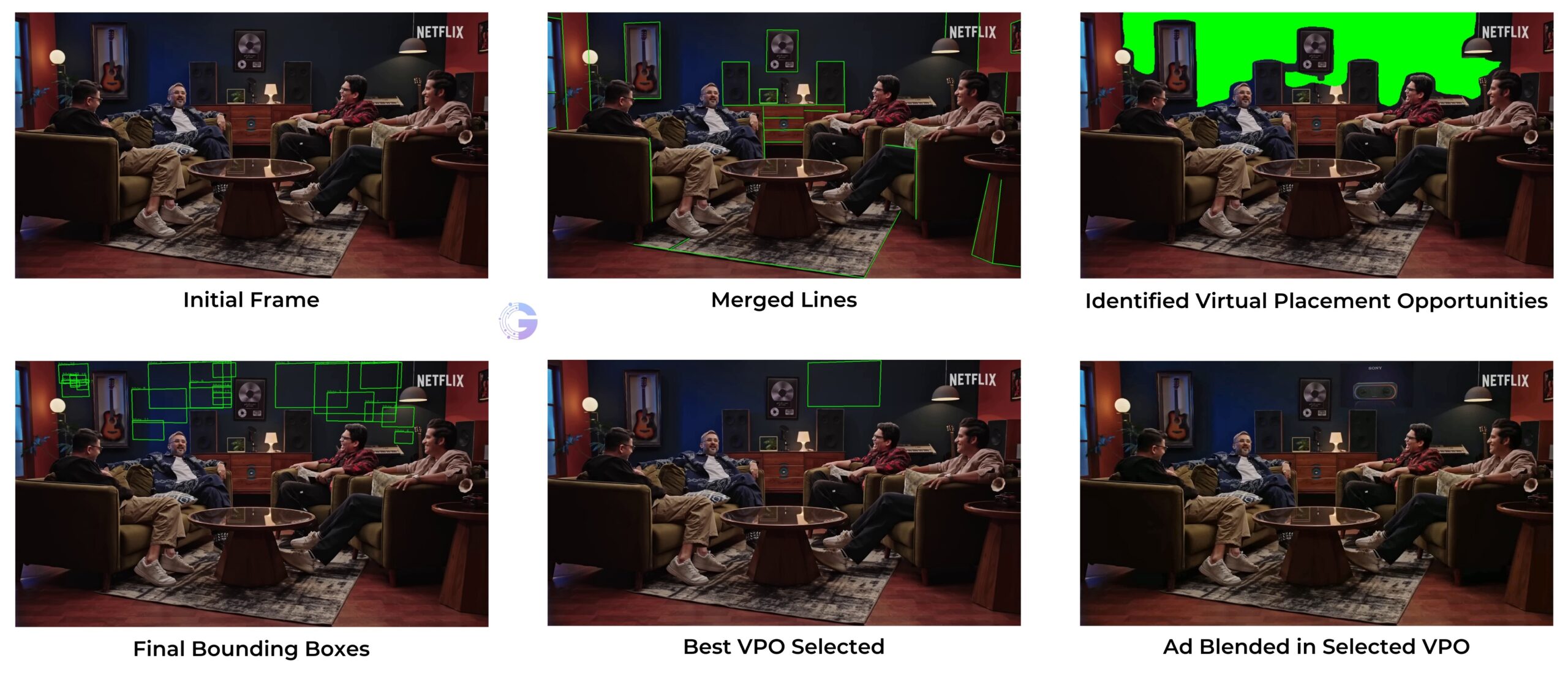
2. Detecting Virtual Placement Opportunities (VPOs)
Every surface or area is not suitable for placing ads. Location matters a lot.
The system spots things by breaking down scenes plus spotting key areas such as: Walls, Billboards, Notice boards, Digital screens, Blank counters or bare spots, Clear background spaces, etc.
The goal is to spot areas that won’t interfere with characters, key items, or the plot flow.
3. Matching VPOs With Ad Aspect Ratios.
Every detected VPO’s gets checked against the desired advertisement layout:
- Landscape panels (16:9)
- Square product labels (1:1)
- Vertical banners (9:16)
- Small horizontal strips for sports or news scenes.
This filter stops uneven stretching or scaling by keeping things natural. Just the regions where the ad feels right make the cut.
4. Virtual Placement Opportunity (VPO) Filtering.
Once VPOs are identified, the system will do context checks/contextual filtering to narrow things down.
- Will a character walk in front of it?
- Does it feel overcrowded here?
- Could glare or light mess up how natural it looks?
- Does the spot match how people look, according to eye movement patterns?
This step acts like a smart filter, making sure the spot fits naturally into the moment – so it doesn’t seem forced or out of place.
4.1. Identifying VPOs for 3D Object Placement.
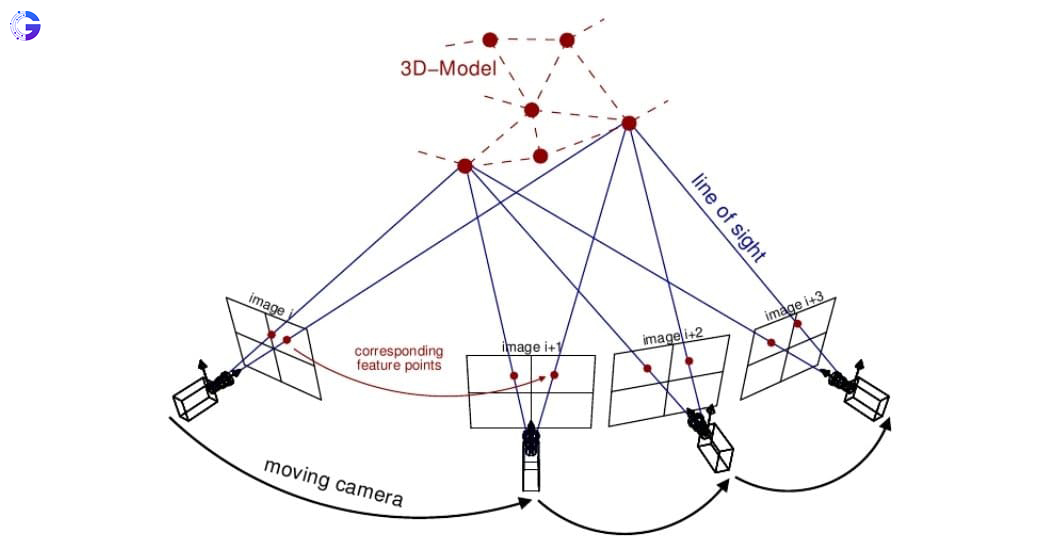
Picking spots for 3D objects isn’t just about finding flat areas. Instead, the model checks open spaces where a virtual object could realistically sit without looking off. By guessing depth from single images or comparing multiple views over time, it builds a rough 3D layout of the surroundings. This helps spot solid surfaces – like tables or floors – as well as fixed markers and empty zones that safely hold an object as you move around.
These areas get checked for size stability, how the camera shifts, chances of being blocked, also possible clashes with things that move. Spaces only pass if they stay accurate across the whole clip – no matter how the camera moves – becoming trusted 3D zones where virtual objects look real, sized right, fitting in smoothly.
5. Selecting the Best Placement Region
Every leftover area gets a certainty rating using: Visibility duration, Camera perspective consistency, Viewer gaze probability, Minimum occlusion risk, Scene relevance, etc.
The top-rated area turns into the active ad placement zone.
If you’re running different ad versions, the system could save multiple viable zones for later customization.
6. Perspective Correction and Surface Mapping
To stop an ad looking dull, artificial, or stuck on awkwardly, the tool adjusts it by:
- Homography transformation.
- Vanishing point estimation.
- Plane projection.
- Depth-aware mapping.
- Motion stabilization.
This step makes sure that the ad fits the camera angle, shape, space, also how things moved in the original shot.
Our engineering previews clearly reveal how edges, perspective lines, and planes are computed – so the system knows where the ad fits in the 3D space.
7. Realistic Ad Blending and Rendering.
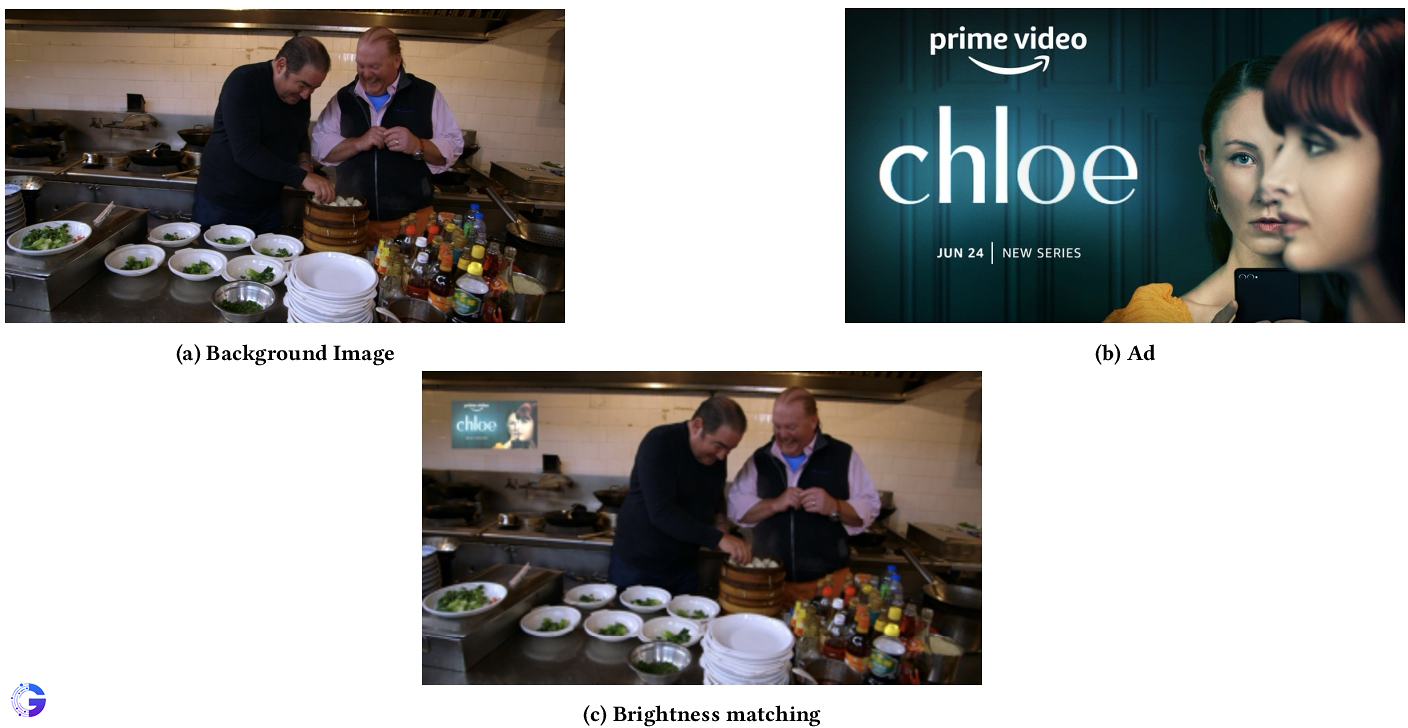
Just putting an ad somewhere won’t work. It needs to fit in, almost like it was meant to be there.
The system applies: Lighting alignment, Material plus surface look imitation, Noise matching, Shadow modeling, Film grain synchronization, Lens distortion matching, Color grading but also balancing the tones.
At this stage, the added thing blends right into the scene – like it was already there when they shot the footage.
8. Final Output and Versioning.
When the rendering finishes, you can save several copies of the same thing like:
- Geography-based brand versions.
- Campaign-based alternates.
- Subscription-tier-based versions (ad vs ad-free tiers).
- Context-based seasonal variations (holiday, sports season, regional events).
This turns virtual product placement into more than just where things go – it’s a way to grow income steadily.
Advantages of Virtual Product Placement.
Virtual Product Placement unlocks several strategic benefits:
| Advantage | Impact |
| Non-interruptive experience. | Viewers are not forced to stop watching to receive an ad. |
| Scalable monetization. | One content asset can generate hundreds of advertiser variations. |
| Post-production flexibility. | Ads can be inserted, changed, or removed at any time – even after release. |
| Audience-specific targeting. | Different viewers can see different ads in the same frame. |
| Cost-efficient for studios and brands. | No reshoots, no re-recordings, no prop sourcing. |
| Enables evergreen inventory. | Old or previously monetized content becomes revenue-generating again. |
In simple terms: Virtual product placement converts every frame in a content into an updatable advertising opportunity.
Where This Technology Is Heading?
The next phase for virtual product placement/in-scene ads isn’t only about placing ads – it’s tweaking them live, depending on factors like:
Viewer demographics, Location, Time, User interests, Streaming tier, Seasonal trends, etc. Two people could watch the same movie scene and see two completely different brands – both relevant to their context.
This takes video a step nearer to what the web’s been doing – sending tailored content depending on who you are or where you’re at.
Closing Thoughts:
Virtual product placement isn’t just another flashy design idea or test run – it’s how brands adapt to today’s viewing habits. Since more people want no ads, yet ad space keeps getting smaller, this approach keeps shows enjoyable while still making money at scale.
Using smart scene analysis along with shape detection and high-quality visuals, VPP helps companies fit right into videos – seamlessly blending in instead of breaking the flow.
The future of ads won’t shout – instead, it’ll think ahead, fit right in, while fading into the background.
At Gyrus AI, we’re helping TV networks, streaming services, and live video creators add digital 2D or 3D ads straight into scenes – no need to film again, no interruptions to the story, plus zero extra workload on set. Since you’re checking out ways virtual placements might open up fresh ad space, boost income, while building tailored, location-based earnings from one version of your show – we’d be happy to support your trial runs and growth plans.
For details or to start trying this tool now, visit www.gyrus.ai


